Every form submission,
instantly in Telegram
B418 Telegram for Contact Form 7 relays every submission to the chat where your team actually looks — with zero code.
Works alongside CF7 email — never instead of it.
You already get CF7 emails.
You just don't see them in time.
Leads, bookings, and support requests sink into the inbox. In Telegram, they ping the person who can act — the moment they arrive.
Three steps, all in your WordPress admin
Add a bot
Create one with @BotFather and paste its token. It's validated against the Telegram API the moment you save.
Add a chat
Invite the bot to a group, channel, or topic — then click "Detect chats" and pick it from the list. No ID hunting.
Create a connection
Pick a form, a bot, one or more chats, and optionally a template. Send a test — done.
Everything lives in one clean admin screen
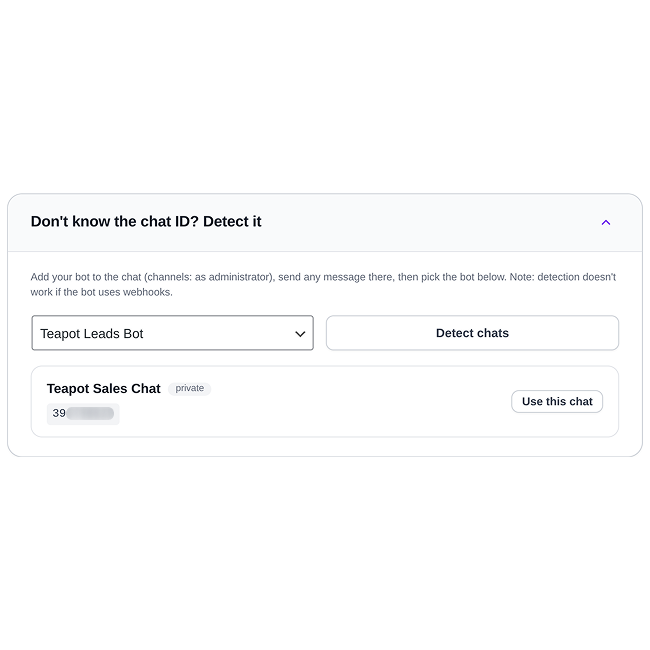
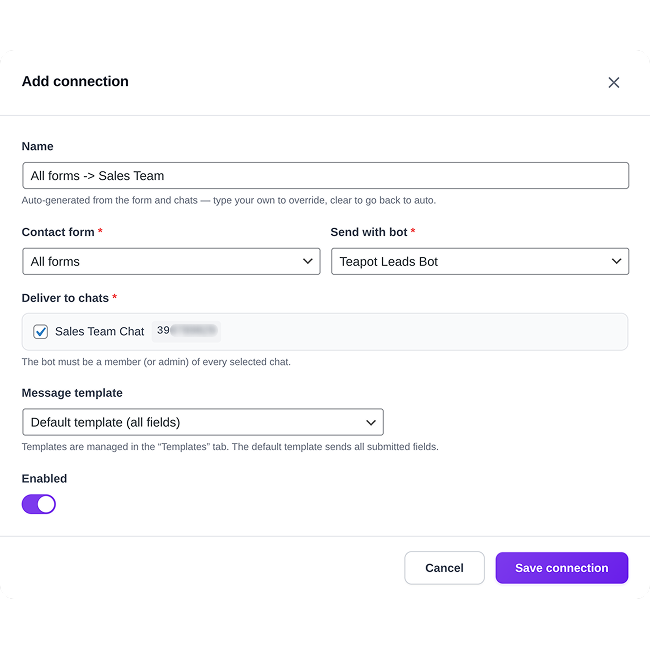
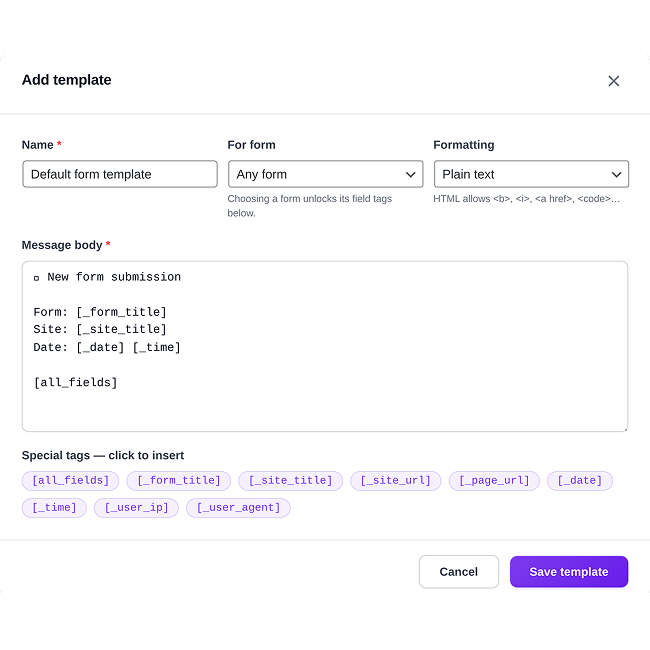
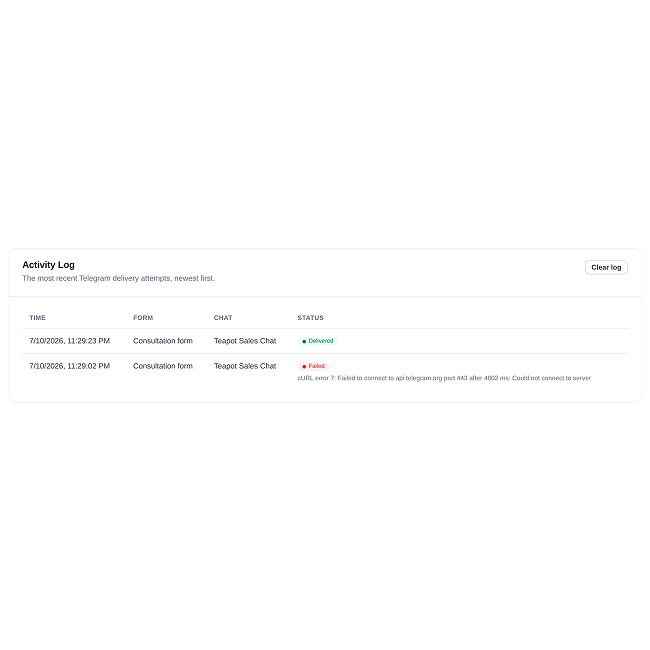
Don't take the screenshots' word for it — spin up a throwaway WordPress with the plugin preinstalled, right in your browser. Nothing to install, nothing to clean up.
Small plugin, serious routing
Routing
- Any form → any chatOne form can notify several chats; several forms can share one. One screen covers a whole agency.
- Groups, channels & topicsPrivate chats, groups, channels, and supergroup topics — route leads down to a specific thread.
- Multiple botsAdd as many bots as you need, e.g. one per client or per site.
Templates
- CF7-style tagsUse the same
[field-name]tags as CF7 mail, plus[all_fields],[_form_title],[_page_url]and more. - Telegram HTML formattingBold, italic, links, code, spoiler, blockquote — notifications read clean, not like a data dump.
Reliability
- Never blocks your formsTelegram delivery runs alongside CF7 email. If Telegram is down, your form and mail are unaffected.
- Live token validationA typo'd bot token is caught when you save it — not when a real lead is lost.
- Test everythingSend a test to a single chat, or fire a whole connection with sample data before going live.
Visibility
- Activity logSee what was delivered and what failed, right in the dashboard — no server logs required.
- Built-in setup guideA visual bot → chat → form → template flow in the admin gets new users productive in minutes.
Make every submission
dependable
The free plugin sends your notifications. Pro makes sure they arrive — with the files attached, to the right people, every time — and keeps a full record when they do.
Files, not just filenames
Visitors send CVs, signed contracts, product photos — Pro delivers them into the chat, right under the message they belong to.
- Every CF7 upload field, forwarded automatically
- Documents up to 50 MB
- Images previewed as viewable Telegram photos
Route by what's inside
Each rule carries its own conditions, so a form fans out to the right people instead of flooding one channel.
- 10 operators, combined with AND / OR logic
- Match any field — budget, department, country
- “Budget > $10k” → your priority sales chat
Deliveries that self-heal
Rate limits and network blips no longer mean a lost lead. Pro retries in the background until it lands.
- Smart backoff: 1m → 5m → 15m → 1h
- A background sweep catches anything missed
- Re-sends only the file if the message already went
A searchable archive
A permanent, queryable record of every submission — your CRM-lite for form leads, long after the message scrolls away.
- Full field data and every delivery attempt
- Filter by form and by status
- One-click “Resend now” from the admin
| Free | Pro | |
|---|---|---|
| Send form submissions to Telegram | ✓ | ✓ |
| Multiple bots, chats, channels & topics | ✓ | ✓ |
| Message templates & formatting | ✓ | ✓ |
| Forward uploaded files & images | — | ✓ |
| Conditional routing | — | ✓ |
| Automatic delivery retries | — | ✓ |
| Full submission & delivery history | — | ✓ |
| One-click manual resend | — | ✓ |
Installs alongside the free plugin — nothing to reconfigure, no data to migrate.
Purely additive
CF7 keeps sending email exactly as before. The plugin never blocks or alters your existing form flow.
Official API only
The plugin talks to the official Telegram Bot API and nothing else — no third-party relays.
Nothing hidden
What's sent to Telegram and when is documented plainly in the readme's external-services disclosure.
Where do I get a bot token?
Message @BotFather on Telegram, send /newbot, and follow the prompts. BotFather replies with the token — paste it into the plugin and it’s validated on save.
How do I find my chat ID?
You don’t have to. Add your bot to the chat (for channels: as an administrator), send any message there, then click “Detect chats” — the plugin lists every chat the bot has recently seen and you pick from the list.
Can one form notify several chats?
Yes. A connection accepts any number of chats, and you can create any number of connections per form.
Does it work with supergroup topics (threads)?
Yes — set the optional thread ID on the chat and messages land in that specific topic.
Does it change how CF7 sends email?
No. Telegram delivery runs in addition to normal CF7 mail and never interrupts it. If Telegram is unreachable, your form and its email flow are unaffected.
What does Pro add on top of the free plugin?
Four things the free version doesn’t do: uploaded files and photos delivered into the chat, conditional routing (e.g. “budget over $10k” goes to the priority sales chat), automatic retries when Telegram is briefly unreachable, and a searchable archive of every submission with one-click resend. It installs alongside the free plugin — nothing to reconfigure.
Stop missing form submissions
Start free and set up in minutes — go Pro when a missed lead costs real money.
Free
$0Instant Telegram notifications for every CF7 form — no code, no limits on bots or chats.
- Every submission delivered to Telegram
- Multiple bots, chats, channels & topics
- Templates with Telegram formatting
- Activity log & test sends
Free forever · GPL-2.0 · open source · live demo
Pro
UpgradeEverything in Free, plus delivery you can stake a sale on.
- Uploaded files & photos land in the chat
- Conditional routing with AND / OR rules
- Automatic retries — no lost leads
- Searchable archive & one-click resend
Installs alongside the free plugin — nothing to migrate.
GPL-2.0 · Requires Contact Form 7 · WordPress 6.0+